Overview
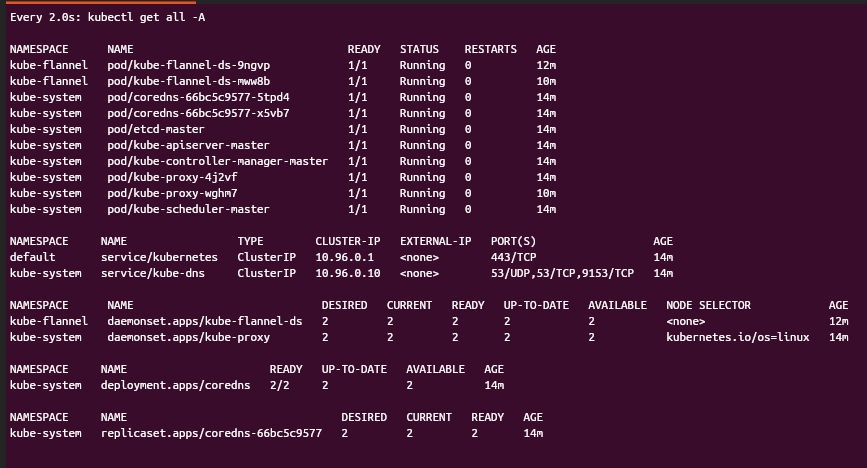
This project documents the creation of a fully functional 2-node Kubernetes cluster using `kubeadm` and Multipass on Ubuntu Desktop. It was designed to simulate real-world infrastructure challenges and prepare for the Certified Kubernetes Administrator (CKA) exam.
Challenges & Lessons Learned
❌ **WSL2 Limitations**: Initial attempts using WSL2 failed due to networking isolation and lack of systemd support.
❌ **Raspberry Pi 400 Architecture**: ARM-based setup introduced compatibility issues with Kubernetes binaries and container runtimes.
❌ **Hyper-V Conflicts**: Multipass defaulted to Hyper-V, which was unsupported on Windows Home, requiring a switch to VirtualBox.
❌ **Firewall Restrictions**: The Kubernetes API server was unreachable until Windows firewall rules were manually adjusted to allow port 6443. (Initial tries with WSL port and traffic forwarding on Win11)
---
Each obstacle was met with research, experimentation, and adaptation, ultimately leading to a stable, scalable cluster.
---
Step-by-Step Setup Guide
1. **Create Instances**
- `multipass launch --name master --mem 2G --disk 20G`
- `multipass launch --name worker --mem 1G --disk 10G`
2. **Install Dependencies**
- containerd, kubeadm, kubectl, kubelet
3. **Configure Kernel & Disable Swap**
4. **Initialize Control Plane**
- `kubeadm init --pod-network-cidr=10.244.0.0/16`
5. **Apply Flannel Network**
- `kubectl apply -f https://github.com/flannel-io/flannel/releases/latest/download/kube-flannel.yml`
6. **Join Worker Node**
- Use `kubeadm join` with token and hash
7. **Verify Cluster**
- `kubectl get nodes`
Technologies Used
- Ubuntu Desktop 24.04 LTS
- Multipass (VirtualBox backend)
- kubeadm, kubectl, containerd
- Flannel CNI
- Bash scripting, systemd, Linux networking
Project Type
Infrastructure Engineering, DevOps / Cloud Native, CKA Exam Prep
Related Resources / Blog Posts
Check out other projects below:
View More Projects